Google Local Knowledge Panel Now Shows As An AI Overview
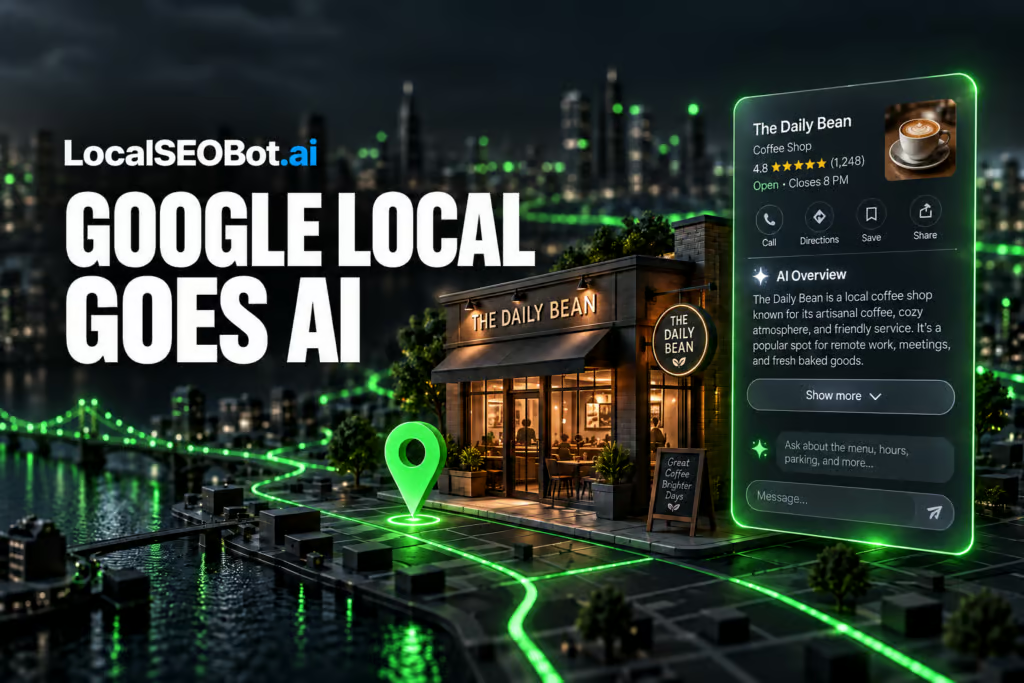
Readers running a Google Business Profile can now find their local knowledge panel replaced by an AI Overview block, complete with a Show more button that opens an AI Mode style chat directly from the local listing. The change means the top of a business result on Google is no longer a static summary pulled from the profile; it is a generated answer the user can keep asking questions about.
What changed in the local panel
Google is converting the local knowledge panel, the box that appears on the right side of the search results and that is fed by a Google Business Profile, into an AI Overview listing. The label at the top of the panel now reads AI Overview, and beneath the generated summary sits a Show more button.
Pressing Show more expands the answer and drops the user into a follow-up interface that mirrors the look and feel of AI Mode, Google’s conversational search experience. From there, a searcher can keep asking questions about the business without leaving the results page.
How accurate is the AI version
Early views of the new panel are largely correct on the basics: business name, category, location, hours, and the standard profile fields. The weaker spot is niche or specialty information that lives on a business’s own website rather than in the Business Profile. When that source material is thin, dated, or missing, the AI summary reflects it and can describe services the business no longer really offers.
The lesson for any business owner is straightforward: if the AI Overview is going to describe what the company does, the description the AI draws from had better be current. Updating the Google Business Profile is the obvious first step. The less obvious step is making sure the about, services, and case study pages on the company site say the same things in the same language, so the AI has fresh, consistent material to read.
Why Google is pushing AI into every surface
Replacing the panel with an AI Overview adds follow-up questions about directions, services, and availability, which lengthens the time a searcher spends on Google.
For business owners, the practical effect is that the panel is now editorial as well as factual. A static profile line about niche solutions, written years ago and never refreshed, can show up as the AI’s confident answer to what a business does today. The panel no longer just mirrors what is on the profile; it interprets it.
What a business owner can do about it
Three concrete steps make the new panel work for the business.
- Refresh the Google Business Profile. Update the business description, services list, and categories so the primary signals are current.
- Rewrite the on-site about and services pages. The AI pulls from the open web too, so a clearly written page that names the work the company actually does today feeds better answers than a thin or generic page.
- Watch what the AI says about the business. Run searches for the company name and the main services, and screenshot the AI Overview each time. If the summary is wrong or stale, fix the source pages and request a recrawl.
Rank position across a service area is exactly the kind of thing a geo grid report surfaces, and SEOScanPro’s GEO Grids map a business’s visibility down to the suburb level so the owner can see where the AI Overview and the standard local panel both behave correctly and where they drift.
FAQ
What is the new AI Overview local knowledge panel?
It is a version of the Google local knowledge panel that is labeled AI Overview at the top. Instead of a static profile summary, the panel shows a generated answer about the business, with a Show more button that opens an AI Mode style chat for follow up questions.
Does the AI Overview replace the Google Business Profile?
No. The Business Profile still feeds the data. The AI Overview is a generated layer on top of the profile, which is why keeping the profile and the company’s own website fresh matters more than ever.
How can a business fix what the AI Overview says about it?
Update the Google Business Profile description, services, and categories, refresh the about and services pages on the company website so the AI has current material to read, and recheck the panel after edits to confirm the summary now reflects the real business.
Related coverage
- What 1.8 million Google Business Profiles reveal about local SEO success – LocalSEOBot
- Weekly Search News Recap: AI Local Results Slop, Google AI Home Page Buttons, and Meta Building a Search Engine – LocalSEOBot
- Inside Google Maps: 72 Ranking Signals and the Architecture Behind Local Search – LocalSEOBot
BizScoreAI
BizScoreAI scores how visible a business is to AI search and shows what its listing looks like to the engines people ask. Open the free listing check.