Complete SEO Checklist: 6 Sections to Win Visibility in Google and AI Search
A structured SEO checklist gives a site a clear path to win visibility in Google and in AI-driven search surfaces such as AI Overviews and ChatGPT.
The checklist is split into six sections: basic SEO, keyword research, technical SEO, on-page content, link building, and AI search. Each section can be tackled on its own, but skipping any one of them leaves gaps where visibility can quietly slip away.
How to use this SEO checklist
An SEO checklist is a step-by-step list of tasks covering every part of SEO, from technical setup to content and links. Go through each item in the order listed. If time or resources are limited, focus on the most relevant tasks first and return to the rest later.
Basic SEO practices checklist
These initial steps establish an SEO foundation and increase the chances of gaining search visibility.
1. Set up Google Search Console and Bing Webmaster Tools
Google Search Console (GSC) and Bing Webmaster Tools monitor SEO performance and let pages be submitted to search engines. These tools allow monitoring of Google- and Bing-specific search performance, submitting sitemaps and URLs, and identifying crawl errors.
Bing Webmaster Tools now includes an AI Performance report, which gives insight into performance across Bing Copilot, AI summaries within Bing, and some partner AI integrations. GSC also includes performance information for AI Overviews and AI Mode in the Generative AI report.
2. Set up Google Analytics
Set up a free Google Analytics 4 (GA4) account to track site traffic and user behavior. Pair it with GSC: GA4 shows what visitors do once they land on the site, while GSC shows how they found it. To see how visitors interact with individual pages, add a heatmap or session-recording tool like Microsoft Clarity.
With GA4, traffic sources (sites, search engines, or AI tools), top pages, bounce rates, and visits are visible. AI-driven search is changing traffic patterns, so users may get answers directly from AI without clicking through, making it more important to focus on what users do once they land than on sheer traffic volume.
3. Install and configure an SEO plugin (for WordPress sites)
A WordPress SEO plugin helps generate sitemaps automatically, edit robots.txt files, and manage on-page optimizations. Popular options include Yoast SEO, which offers AI-assisted content optimization, automated technical SEO, and internal linking suggestions, and Rank Math, which uses AI for keyword research, outline creation, and first-draft writing, plus schema capabilities and page-level performance monitoring. Other content management systems may already include the needed features.
4. Create a robots.txt file
A robots.txt file tells search systems which pages to crawl and which to skip. To see the current file, add “/robots.txt” to the homepage URL. Check the file for errors using a site audit tool. A full indexability check covers meta robots tags and X-Robots-Tag headers, canonical tags, sitemap accuracy, and 4xx and 5xx status codes. A robots.txt file also provides guidance to AI crawlers, so blocking them can limit how content is discovered and used in AI-generated answers.
5. Create and submit an XML sitemap
An XML sitemap helps search engines understand a site’s structure and index pages. WordPress creates a sitemap automatically, as do other popular platforms. If the CMS does not generate one, a sitemap generator tool can. Submit the sitemap to GSC and Bing Webmaster Tools and add the sitemap URL to the robots.txt file.
6. Check Google Search Console for manual actions
Check GSC for penalties called manual actions so they can be resolved quickly. In the sidebar, select “Security & Manual Actions” then “Manual actions” to see detected issues. Spammy SEO tactics like link schemes can lead to Google penalties and hurt overall SEO.
7. Make sure Google can index your website
Indexability is a page’s ability to be added to Google’s index, and pages that are not indexed cannot rank. Being indexed in Google also matters for AI visibility, since many AI tools use Google to find content. Set up a crawl for the website to confirm pages are accessible, and double-check that the main pages are indexed.
Keyword research checklist
Keyword research identifies the search queries and AI prompts relevant to specific products or services.
8. Identify competitor keywords
Identifying competitors’ keywords helps find relevant search queries that could improve visibility. Enter the domain and up to four competitors’ domains in a keyword gap tool. Look for relevant keywords labeled “Missing” (competitors rank but the site does not) and “Weak” (competitors rank higher).
9. Find core topics and keywords
Find the core topics and keywords the audience is searching for. Explore keyword ideas related to the niche using a keyword research tool. Click the “Questions” tab to see question-based keywords people enter into search engines. Look for topics with meaningful search demand, achievable opportunities based on the site’s authority, and clear intent alignment with the goal of the page.
10. Identify prompts your audience uses in AI tools
Knowing what the audience enters into AI tools enables content to be written in a way that improves the likelihood of appearing in AI-generated answers. Survey existing customers and analyze conversations on platforms like Reddit. A prompt research report shows the estimated search volume for each topic and the actual prompts users search, along with the corresponding AI responses.
11. Create a keyword map
A keyword map organizes keywords and prompts into groups based on topic and intent, making it possible for each page to show up for multiple related queries. Add all gathered queries, both search keywords and AI-style prompts, into a spreadsheet and group similar queries by meaning and intent.
12. Analyze the search intent of highly visible pages
Search the target query in Google and review the top results. Pay attention to the types of pages (guides, product pages, comparisons) and how they are structured. Enter the same query into AI tools like ChatGPT or Perplexity to see how the question is interpreted.
13. Identify additional questions people ask
Start with Google’s People Also Ask boxes to find common follow-up questions. Explore community platforms like Reddit and Quora to see how people naturally phrase their questions. Incorporate these questions into content as headings, FAQs, or subsections.
Technical SEO checklist
Following these technical practices allows search engines to crawl and index a site.
14. Make sure you’re using HTTPS
Using HTTPS can help with rankings, as it is a confirmed ranking factor. Confirm the site uses HTTPS by checking for a padlock icon in the browser’s address bar. A site audit tool provides a detailed report on HTTPS status, including security certificates, server protocols, and website architecture.
15. Check for duplicate versions of your site in Google’s index
Domains can appear as https://www.domain.com, https://domain.com, http://www.domain.com, or http://domain.com. All versions except one should 301 redirect to the primary domain. Enter each variant in a browser to confirm redirects work.
16. Find and fix crawl errors
Crawl errors occur when search systems fail to access certain pages or encounter improper canonical tags. Identify crawl errors through GSC’s “Page indexing” report. Under “Not indexed,” errors appear. Resolve any errors and explore the cause of excluded URLs.
17. Improve your site speed
Improving site speed boosts the user experience and helps search systems process pages. Google uses Core Web Vitals to measure speed and usability:
- Largest Contentful Paint (LCP): time needed for the main content to load
- Interaction to Next Paint (INP): time from user interaction to visual response
- Cumulative Layout Shift (CLS): how much the layout shifts during loading
FAQ
What should an SEO checklist include?
A complete SEO checklist covers six areas: basic setup (Search Console, analytics, sitemaps, indexability), keyword research and prompt research, technical SEO (HTTPS, crawl errors, speed), on-page content, link building, and AI search readiness.
How does AI search change an SEO checklist?
AI search adds new surfaces like AI Overviews, AI Mode, and chatbot answers. A modern checklist includes tracking performance in Bing’s AI Performance report, allowing AI crawlers in robots.txt, and writing content that matches the natural-language prompts people use in AI tools.
How often should an SEO checklist be reviewed?
An SEO checklist should be worked through at least once during a site build or major redesign, and revisited whenever a new section (content, links, technical fixes) is added. AI search guidance in particular shifts often, so the AI search section benefits from quarterly review.
Related coverage
- What 1.8 million Google Business Profiles reveal about local SEO success – LocalSEOBot
- Weekly Search News Recap: AI Local Results Slop, Google AI Home Page Buttons, and Meta Building a Search Engine – LocalSEOBot
- Google Search Console Links Report Not Updated In A Month – LocalSEOBot
SEOScanPro
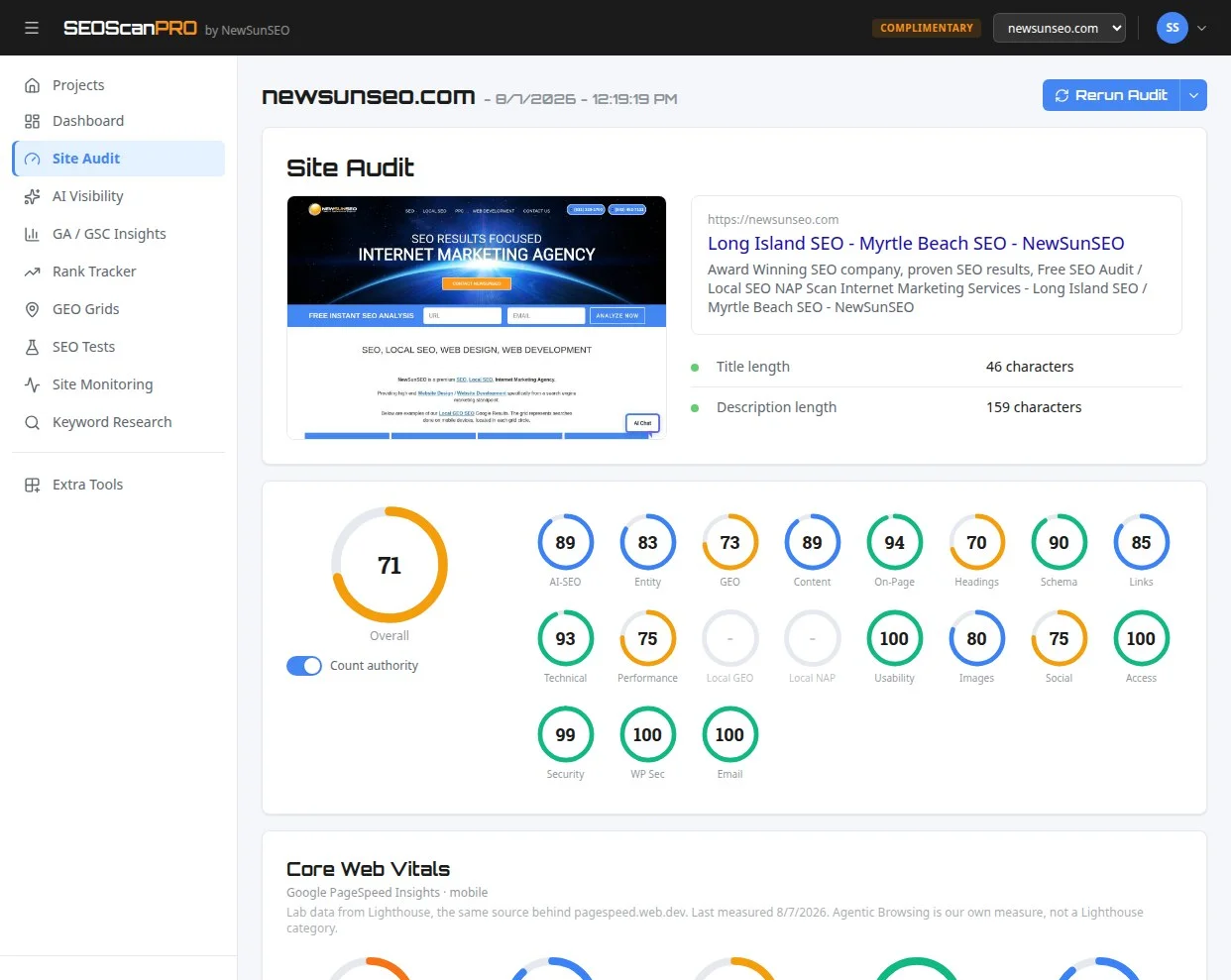
SEOScanPro’s site audit tool runs a full technical audit of a site and shows the measured result behind every check. Open the site audit tool.