Rogue Agent: a code-injection flaw in Google DialogFlow CX and what it means for AI assistants
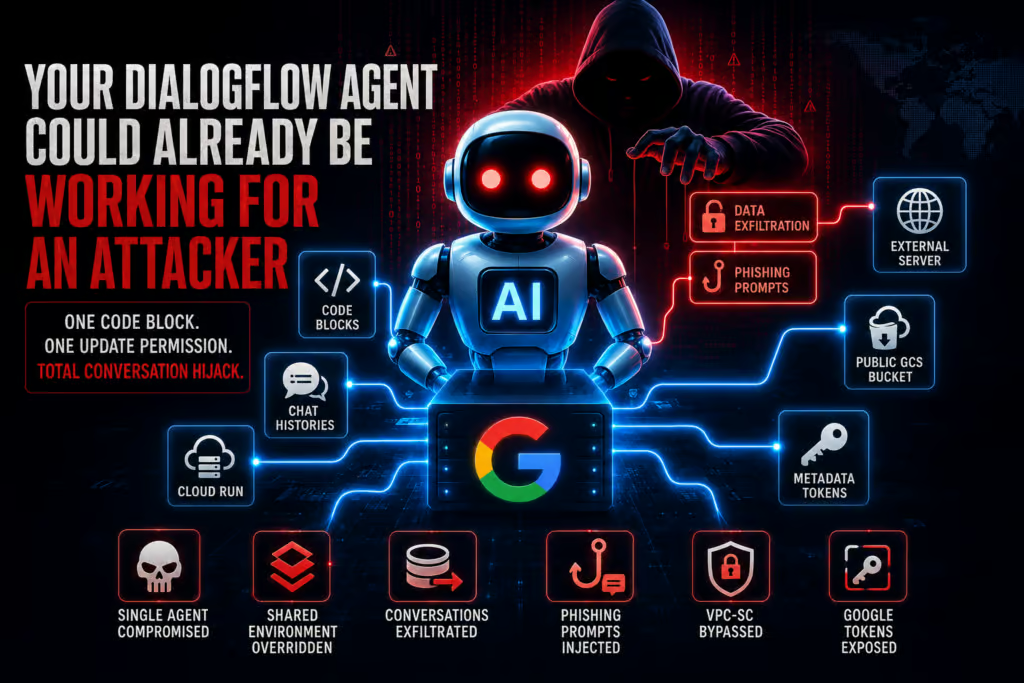
Researchers at Varonis Threat Labs disclosed a critical vulnerability in Google Cloud’s DialogFlow CX service that allowed attackers to inject persistent malicious code into conversational AI agents. The flaw, nicknamed Rogue Agent, was reported to Google in November 2025, received an initial security update in April 2026, and was fully resolved in June 2026.
DialogFlow CX is Google’s conversational AI platform for building voice and text chatbots that handle customer support, financial services, healthcare assistants, and enterprise workflows. These agents frequently process personally identifiable information, payment details, and other sensitive business data, and they integrate directly with backend systems, which makes their security posture critical.
What the Rogue Agent vulnerability is
The flaw lived in a feature called Playbook Code Blocks, which lets developers embed custom Python logic inside conversation flows so agents can process user input, call external APIs, and manipulate data dynamically.
Code Blocks execute inside a Google-managed Cloud Run service with public network egress enabled by default. According to the Varonis write-up, every DialogFlow CX agent that uses Code Blocks within the same GCP project effectively shares that same Cloud Run environment, which sits outside the customer’s visibility and control.
The only permission needed to configure a Code Block was dialogflow.playbooks.update, which can be granted at the project level or scoped to a single agent. Because Playbooks could include Code Blocks, the design also allowed arbitrary Python execution by default. The researchers reported finding no code constraints in place.
How attackers could exploit it
Inside the Cloud Run container, the researchers found a writable Python file named code_execution_env.py that was responsible for executing configured Code Blocks using Python’s exec() function. Each user Code Block was appended to internal system code before being passed to exec().
That internal code defined critical variables such as history (the full conversation history, including past user utterances and agent responses) and state (session-level parameters such as the current session ID). Because the injected Code Block ran in the same scope, it could reference these variables directly, giving the attacker full visibility into ongoing conversations.
The exploit chain looked like this:
- The attacker wrote a Code Block that downloaded a modified version of
code_execution_env.pyfrom an attacker-controlled public GCS bucket and overwrote the original file in the Cloud Run container. - The modified file intercepted every execution, exfiltrated conversation data to an attacker-controlled server using the internal
historyandstateparameters, and injected phishing prompts disguised as legitimate reauthentication requests via the internalrespond()function, prompting users to submit credentials. - After the overwrite, the attacker restored the original Code Block configuration in the DialogFlow console UI so the activity looked normal, while the malicious logic persisted silently in the Cloud Run environment. Cloud Logging did not record the overwrite or the injected logic, which made detection very difficult.
Because the shared Cloud Run instance could be reached by every agent in the project, a single foothold on one agent effectively opened the door to systemic compromise across the whole project.
Two additional weaknesses the researchers found
VPC Service Controls bypass
DialogFlow CX agents often run behind VPC Service Controls, which enforce perimeter security to prevent data exfiltration. Because Code Blocks execute in a Google-managed Cloud Run service with unrestricted outbound internet access, that environment sat outside the project’s VPC-SC perimeter, turning the shared Cloud Run instance into a covert exfiltration proxy. Using preinstalled libraries such as urllib, the researchers established a bidirectional channel to an external server and bypassed VPC-SC entirely, which could also support a command-and-control channel for persistent remote access.
Credential leakage via IMDS
The Instance Metadata Service was reachable from inside the Cloud Run service, which allowed the researchers to retrieve access tokens belonging to a Google-managed service account. Varonis characterized the account as low-privileged, but noted that exposing IMDS inside a code-execution environment violates isolation principles and could be used for privilege escalation if the service account ever received additional roles.
What detection steps does Varonis recommend?
Detection was difficult because the file overwrite happened inside a Google-managed Cloud Run environment outside customer visibility, and Cloud Logging does not capture the exact configuration changes. Even with the patch applied, Varonis and Google recommend that customers audit DialogFlow CX configurations for suspicious Playbook updates and analyze past playbook update actions.
Recommended actions include:
- Review logs for playbook updates. If DATA_WRITE Audit Logs are enabled for the DialogFlow API, look for successful past events with unusual indicators, such as rare API access by a specific user, atypical access times, or unusual IP addresses.
- Query for failed requests. Run a Cloud Logging query for failed user requests and review
protoPayload.status.message, which can include exceptions thrown by Code Blocks that may indicate malicious logic. - Manually review Code Blocks. In the DialogFlow CX console for each agent, navigate to Playbooks and review each Playbook’s current Code Block configuration to confirm that all configured Code Blocks are whitelisted and approved. Attackers can remove malicious blocks after exploitation, but a sloppy attacker may leave them behind.
What this means for AI agent security
Rogue Agent joins other AI-specific issues Varonis has disclosed, such as Reprompt in Microsoft Copilot Personal and SearchLeak in Microsoft Copilot Enterprise. Varonis states it is not aware of any exploitation in the wild before Google’s patch release.
The broader lesson, the researchers argued, is that AI agents are expanding the attack surface of cloud platforms. A single edit permission on a single agent, combined with a shared execution environment and a writable system file, was enough to compromise every agent in the project. Defenders need layered controls, including configuration review and behavioral monitoring, because logging alone may not capture what happens inside managed runtimes.
All affected components have since been remediated, but organizations that used DialogFlow CX Playbook Code Blocks during the affected period should still audit their configurations as a precaution.
FAQ
What was the Rogue Agent vulnerability in Google DialogFlow CX?
Rogue Agent was a critical code-injection flaw in DialogFlow CX’s Playbook Code Blocks feature. It let an attacker with the dialogflow.playbooks.update permission overwrite a writable Python file in a shared Google-managed Cloud Run environment, enabling persistent malicious code execution that could exfiltrate conversation data and bypass perimeter controls.
When was the Rogue Agent flaw reported and fixed?
Varonis Threat Labs reported the flaw to Google in November 2025. Google issued an initial security update in April 2026 and fully resolved the issue in June 2026. Varonis is not aware of any exploitation in the wild before the patch release.
What should organizations do to check for past exploitation?
Customers should audit DialogFlow CX Playbook configurations, review DATA_WRITE Audit Logs for unusual playbook update events, query Cloud Logging for failed Code Block requests, and manually inspect each agent’s Code Blocks in the DialogFlow CX console to confirm they match approved, whitelisted logic.
Related coverage